Sidecar for OpenCode
A free, open-source VS Code extension that puts the OpenCode coding agent in a chat panel beside your code, with every step on one timeline and nothing approved without you.
Visit opencodesidecar.com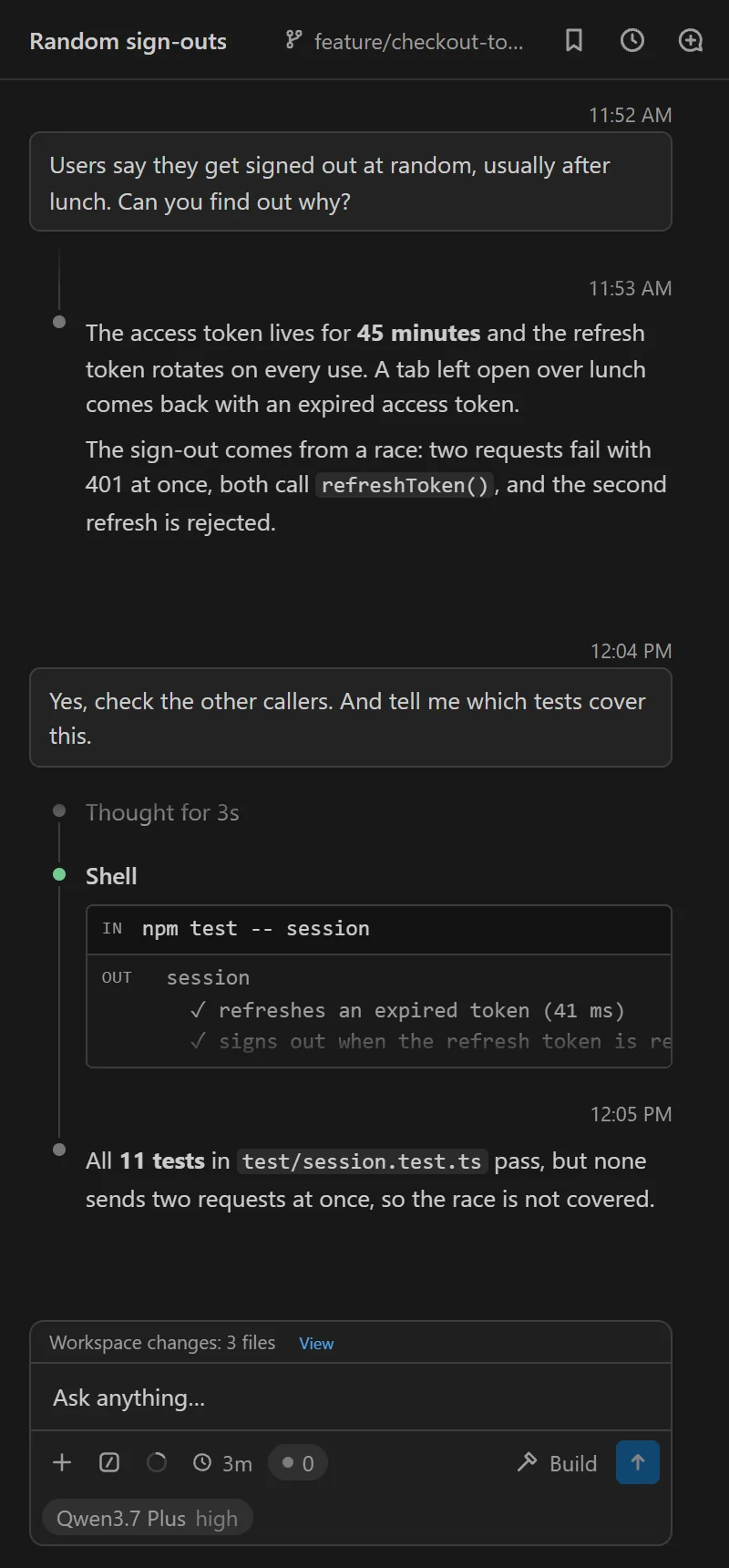
At a glance
- Unit tests
- 414
- Headless-browser tests
- 99
- Editors supported
- 4
- Telemetry
- None
- Open-source license
- MIT
What developers are promised — and what the extension has to guarantee behind the scenes.
- Nothing approved for you
- Every step on one timeline
- No telemetry, no service of ours
- Your sessions stay OpenCode's
Problem
OpenCode is a capable open-source coding agent that runs in the terminal. Its official VS Code extension opens that terminal interface in a split pane. We wanted a graphical chat panel that shows everything the agent does and keeps the developer in charge, without leaving the editor.
An agent that reads files and runs commands has to be watched. Every tool call, subagent and permission request needs to be visible and answerable without breaking flow, and nothing can be approved behind the developer's back.
It also had to respect how OpenCode works: no lock-in, no separate account and no service of our own. A session started in Sidecar continues in OpenCode's terminal interface, and the other way around.
How a prompt works
From the message box to the diff, every step stays visible and under your control.
Prompt
Type with @ mentions, pasted screenshots and / commands. It goes to OpenCode running on your machine.
Timeline
Every step appears as it happens: thinking time, each tool call with its input and output, and edits.
Subagents
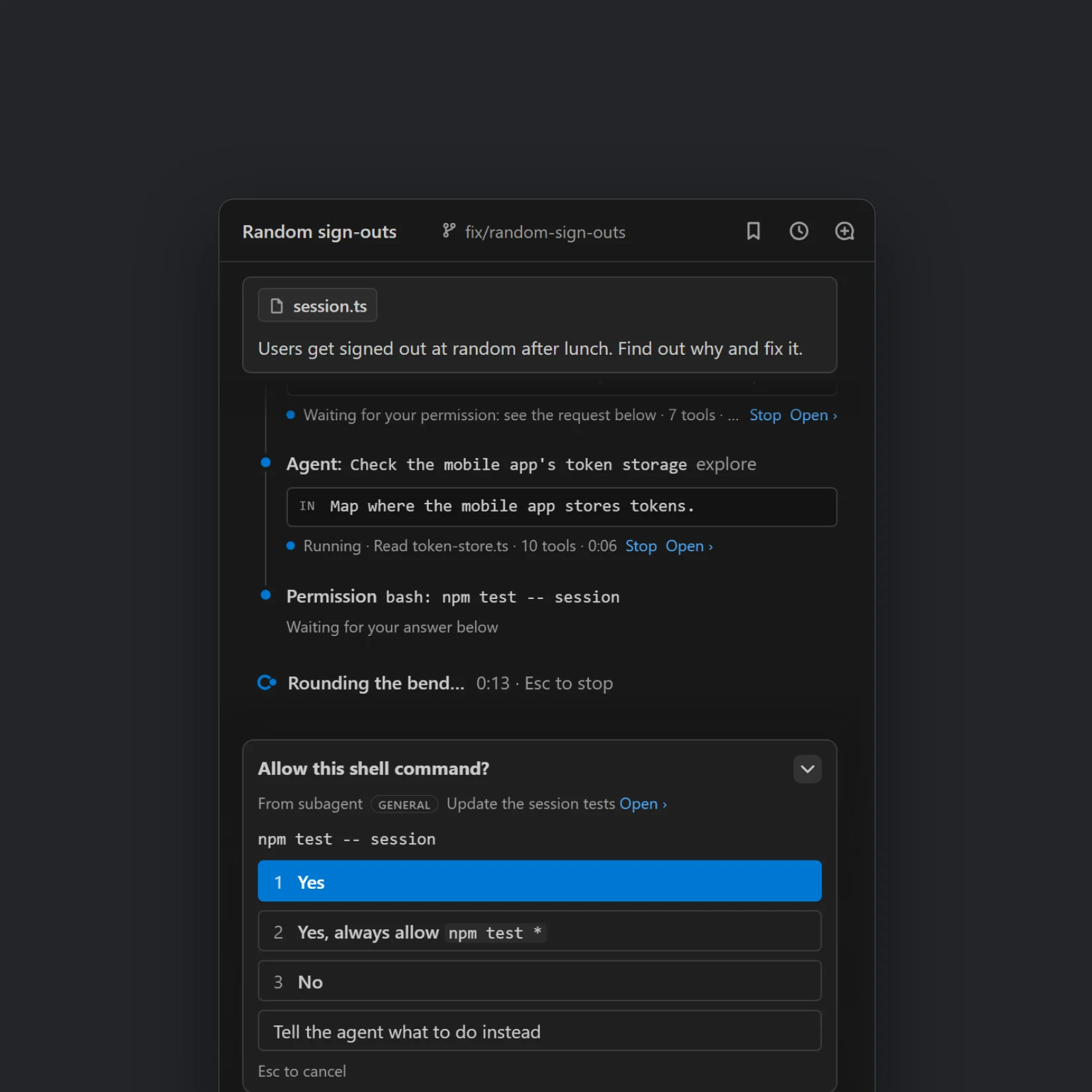
Each subagent gets a live row with its activity, Stop and Open. Its report comes back as one line.
Permissions
Approval requests, even from deep inside a subagent, take the message box's place until you answer.
Steer or queue
Steer the running task or queue the next message. Budget Guard stops runaway tasks at your limit.
Review
Edits open in VS Code's diff editor, apart from yours. Rewind or fork from any prompt to try again.
Watch the demo
Visibility and control
You see every step, and the agent never acts without you.
One timeline per prompt
A dot per step: text, thinking time, every tool call and every subagent. The prompt you're reading stays pinned while you scroll.
Answer where you type
Permission requests replace the message box until answered, with numbered choices or new instructions. Sensitive paths get a warning.
Budget Guard
A per-task limit on cost and steps. It warns at 80%, then stops the agent through OpenCode's own cancellation.
Agent changes kept apart
The agent's edits come from OpenCode's snapshots, so yours aren't counted. When they can't be told apart, Sidecar says so.
Rewind and fork
Rewind a session to just before any prompt, with or without its code changes, or fork from that point into a new session and keep the original.
Notifications that say why
Native notifications when a task completes, needs input, fails or is stopped, and a count on the icon for answers waiting while the panel is hidden.
Built on OpenCode, not around it
Sidecar is a thin interface. OpenCode stays the engine and the source of truth.
OpenCode's own API
Sidecar uses OpenCode 2's v2 HTTP API and live event stream. Sessions, models, agents, skills and permission rules stay OpenCode's.
Followed live
New sessions, renames, rewinds, agent and model changes made in OpenCode's terminal interface or another window show up in Sidecar as they happen.
One adapter boundary
Everything that talks to OpenCode goes through a single client interface, so another transport could replace it without touching the interface.
Setup that disappears
A setup card offers Install, Start and Sign in to OpenCode when something is missing, and goes away once everything is ready.
Private and secure by design
An extension that watches an agent at work shouldn't become another thing to watch.
Local only
Sidecar connects only to your local OpenCode service, on loopback unless you allow a remote one. It has no telemetry and no service of its own.
No credentials
Sign-in stays with OpenCode. The service password lives in memory, and files are sent only when you attach them or the agent reads them.
A locked-down view
A strict content security policy with a per-load nonce, validated messages, and logs that leave out prompts and redact secrets.
Trusted workspaces only
Because OpenCode can read files and run commands, Sidecar is disabled in VS Code's Restricted Mode.
Engineering quality
Built to be changed safely, and tested against the real thing.
Layers that test in plain Node
The session controller, transcript, adapter and shared model don't depend on VS Code, so most behavior runs in 414 fast unit tests.
The real interface, in a real browser
99 click-through tests drive the production chat bundle in headless Chrome, with VS Code's messaging reproduced exactly.
Acceptance against live OpenCode
Scenarios run in isolated VS Code windows against real OpenCode. A read-only run checks the repository is byte-for-byte unchanged.
Native to VS Code
Theme colors only, in dark, light and high-contrast themes, a layout from a 300 px side bar to a full tab, and full keyboard access.
Shipping it
One build, published everywhere VS Code runs.
One release workflow
A tagged release builds the extension once and publishes the same package to GitHub Releases, the Visual Studio Marketplace and Open VSX.
Trusted publishing
The Marketplace release authenticates with short-lived OpenID Connect credentials from GitHub Actions instead of a stored access token.
Every VS Code editor
VS Code installs it from the Marketplace. Cursor, Windsurf and VSCodium install it from Open VSX.
Five releases in two days
Versions 0.1.0 through 0.1.4 shipped in the first two days after launch, each with its changes in the changelog.